Teacher Logs - Clock In / Clock Out
/docs/Teacher-Logs/add-logs
IBEAMS provides several ways for teachers to record their clock in and clock out times.
Schools and madrasahs can choose the method that best suits their workflow.
You can add logs in five different ways.
1. Manually from the Admin Panel
This method allows an administrator to manually enter teacher log times.
Steps:
- Go to Teacher Logs > Add (Logs).
- Select the start date and end date.
- Select the teachers you want to create logs for.
- Click Generate Form.
- Scroll down and enter the log in and log out times.
- Click Save.
2. Import Logs via CSV
Logs can also be imported using a CSV file. This is useful when entering large numbers of logs at once.
Steps:
- Go to Teacher Logs > Add (Logs).
- Select the start date, end date, and the teachers.
- Click Download CSV.
- Open the downloaded file and edit the values as required.
- Save the edited file.
- Click Import Logs CSV File.
- Select the edited file and click Upload.
Ensure the CSV format and structure are not changed. Only edit the log time values.
3. Live Logging on the Teacher Portal
Teachers can log their attendance directly from their Teacher Portal dashboard.
During working hours, teachers will see a log form where they can instantly log their time.
If the teacher arrived earlier or later than the current time, they can manually specify the time.
In such cases, an administrator must approve the change, since this is a live logging system.
Teachers can also go to:
My Logs → Add Log
This allows them to enter logs for previous days.
Log Time Adjustments
In Settings → Teacher Portal, you can configure time adjustments.
This is useful when teachers log their time from inside the classroom rather than when they actually enter or leave the building.
Examples:
- Log in adjustment: 2 minutes
- Log out adjustment: 5 minutes
These adjustments will automatically modify the recorded time.
Time adjustments are helpful when teachers log attendance from the classroom rather than at the entrance of the building.
4. App Kiosk System (Android Tablet)
You can install the IBEAMS kiosk app on an Android tablet for quick clock in and clock out logging.
Download the app from:
https://app.ibeuk.org
Steps:
- Install the app on an Android tablet.
- Log in with your IBEAMS administrator account.
- Go to Administration → Launch Teacher Logger.
Teachers can then log their times instantly using the tablet.
:::note The log time adjustments configured in the settings will also apply to this method. :::
5. Web Kiosk (Tablet / Touchscreen – No App Required)
You can also run the teacher logging kiosk directly from a web browser, without installing any app.
Open the URL listed on the device:
https://teacher-kiosk.ibeuk.org/YOUR-URL
This launches a full‑screen teacher logging kiosk.
Advantages of the Web Kiosk
- Works on any device with a browser
- No app installation required
- Ideal for entrances, staff rooms, or reception areas
- Teachers can quickly clock in and clock out
- The kiosk automatically updates if logs are added through the admin panel or teacher portal
Teacher Kiosk Settings
Below is the configuration page where you can customise the tablets used for the teacher kiosk system.
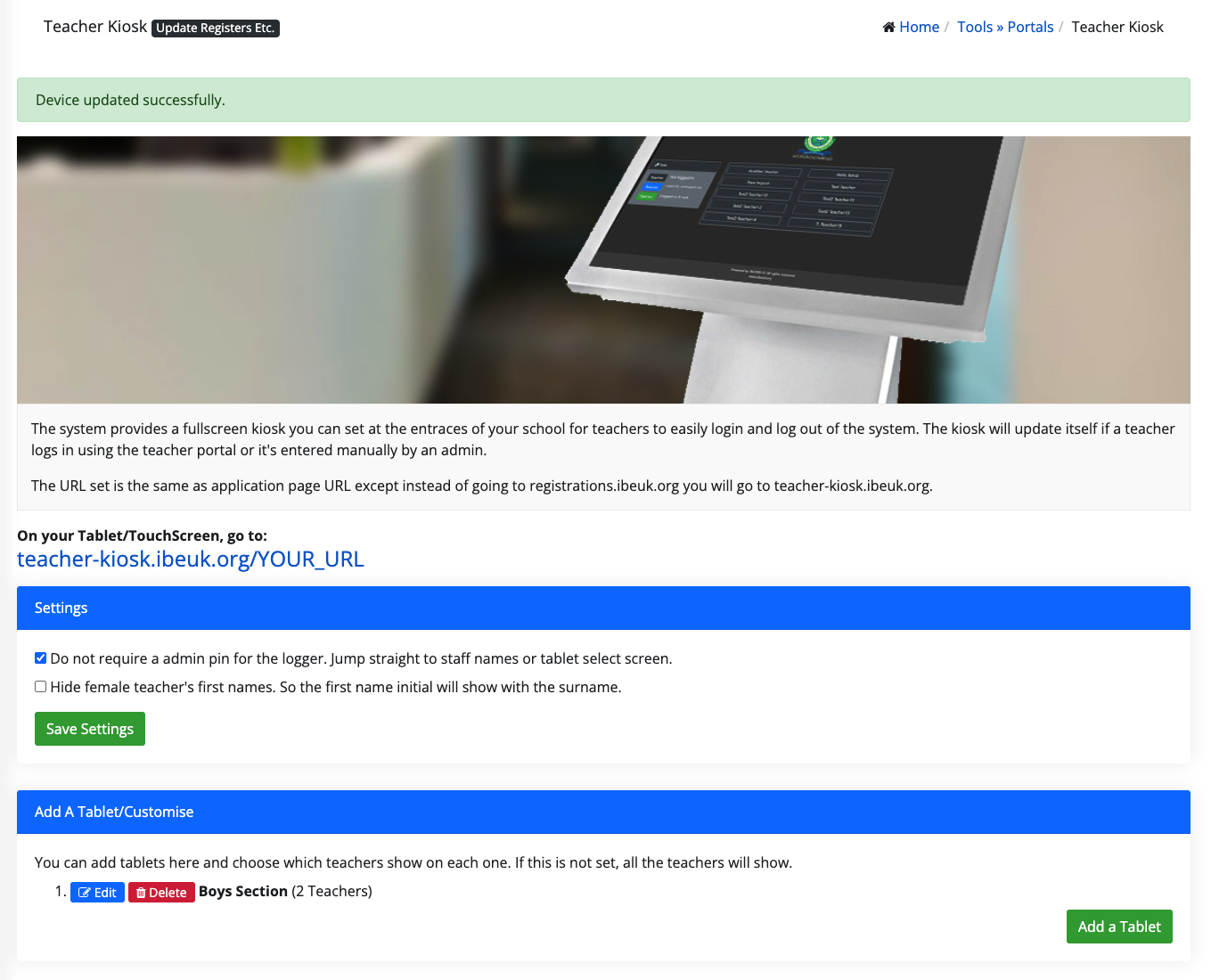
From this page you can:
- Create multiple tablet profiles
- Assign specific teachers to each tablet
- Give tablets a name or location
- Control which teachers appear on each device
If no teachers are selected, all teachers will appear by default.
Additional Settings
The kiosk settings page also allows you to:
- Skip the admin PIN so the device goes directly to the staff list
- Hide female teachers’ first names (showing surname and first initial only)
If the admin PIN requirement is disabled, ensure the tablet is placed in a supervised location such as a staff entrance or reception area.
Recommended Setup
Many schools use a combination of methods:
- Tablet kiosk at the entrance for daily logging
- Teacher portal as a backup method
- Admin panel or CSV import for corrections or bulk entries
This ensures logs remain accurate, flexible, and easy to manage.