
PayFast Setup Guide/Tutorial
/docs/Fees/setup-payfast
PAyFast is for payments only for South African countries. It does not support direct debit.
Use the "Step Complete" button to track your progress.
Approximate time required: 3 minutes for an average user.
-
Create a PayFast account here: https://registration.payfast.io/
Please Note: We cannot offer assistance in creating a PayFast account. Please contact PayFast support for help if you signup registration issues.Step Complete
-
Go to the Dashboard/Account Information page
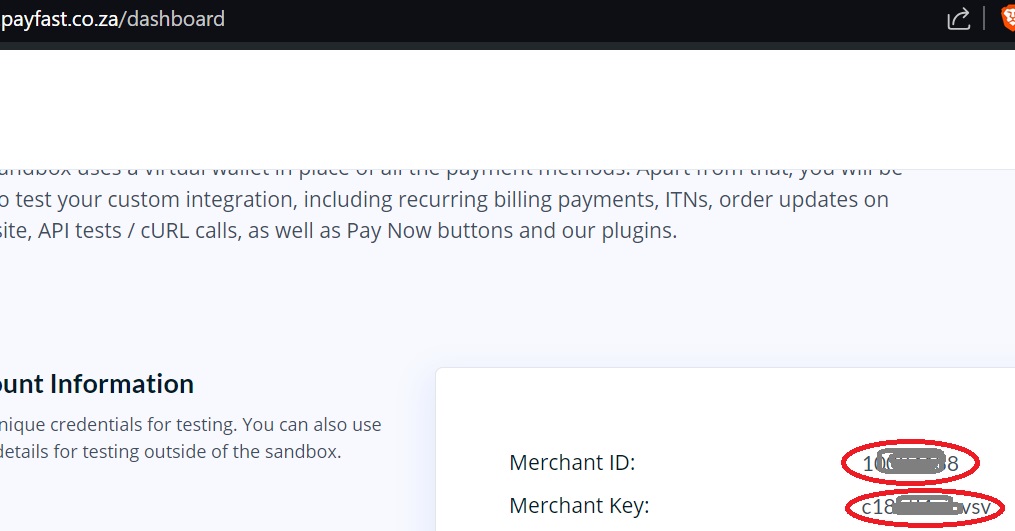
(click to open in new window)• On IBEAMS go to Settings > Payment Gateways > PayFast > Configure
• Enter the Merchant ID in the Merchant ID field on the setup page on IBEAMS.
• Enter the Merchant Key in the Merchant Key field on the setup page on IBEAMS.
• Set a passphrase which can be anything such as "ibeamsibeams" or "ibeamspayfast" or anything you wish and enter it in Passphrase field on the setup page on IBEAMS.
Step Complete
Important final note: Remember to enable the payment method for it to become active.
« Back to Card/Direct Debit ^ Back to top